• Email:
  • Feeds

  • Archive for the ‘Web’ Category


    用Twitter的cursor方式进行Web数据分页

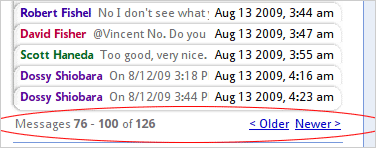
    本文讨论Web应用中实现数据分页功能,不同的技术实现方式的性能方区别。

    上图功能的技术实现方法拿MySQL来举例就是

    select * from msgs where thread_id = ? limit page * count, count

    不过在看Twitter API的时候,我们却发现不少接口使用cursor的方法,而不用page, count这样直观的形式,如 followers ids 接口

    URL:

    http://twitter.com/followers/ids.format

    Returns an array of numeric IDs for every user following the specified user.

    Parameters:
    * cursor. Required. Breaks the results into pages. Provide a value of -1 to begin paging. Provide values as returned to in the response body’s next_cursor and previous_cursor attributes to page back and forth in the list.
    o Example: http://twitter.com/followers/ids/barackobama.xml?cursor=-1
    o Example: http://twitter.com/followers/ids/barackobama.xml?cursor=-1300794057949944903

    http://twitter.com/followers/ids.format

    从上面描述可以看到,http://twitter.com/followers/ids.xml 这个调用需要传cursor参数来进行分页,而不是传统的 url?page=n&count=n的形式。这样做有什么优点呢?是否让每个cursor保持一个当时数据集的镜像?防止由于结果集实时改变而产生查询结果有重复内容?
    在Google Groups这篇Cursor Expiration讨论中Twitter的架构师John Kalucki提到

    A cursor is an opaque deletion-tolerant index into a Btree keyed by source
    userid and modification time. It brings you to a point in time in the
    reverse chron sorted list. So, since you can’t change the past, other than
    erasing it, it’s effectively stable. (Modifications bubble to the top.) But
    you have to deal with additions at the list head and also block shrinkage
    due to deletions, so your blocks begin to overlap quite a bit as the data
    ages. (If you cache cursors and read much later, you’ll see the first few
    rows of cursor[n+1]’s block as duplicates of the last rows of cursor[n]’s
    block. The intersection cardinality is equal to the number of deletions in
    cursor[n]’s block). Still, there may be value in caching these cursors and
    then heuristically rebalancing them when the overlap proportion crosses some
    threshold.

    在另外一篇new cursor-based pagination not multithread-friendly中John又提到

    The page based approach does not scale with large sets. We can no
    longer support this kind of API without throwing a painful number of
    503s.

    Working with row-counts forces the data store to recount rows in an O
    (n^2) manner. Cursors avoid this issue by allowing practically
    constant time access to the next block. The cost becomes O(n/
    block_size) which, yes, is O(n), but a graceful one given n < 10^7 and
    a block_size of 5000. The cursor approach provides a more complete and
    consistent result set.

    Proportionally, very few users require multiple page fetches with a
    page size of 5,000.

    Also, scraping the social graph repeatedly at high speed is could
    often be considered a low-value, borderline abusive use of the social
    graph API.

    通过这两段文字我们已经很清楚了,对于大结果集的数据,使用cursor方式的目的主要是为了极大地提高性能。还是拿MySQL为例说明,比如翻页到100,000条时,不用cursor,对应的SQL为

    select * from msgs limit 100000, 100

    在一个百万记录的表上,第一次执行这条SQL需要5秒以上。
    假定我们使用表的主键的值作为cursor_id, 使用cursor分页方式对应的SQL可以优化为

    select * from msgs where id > cursor_id limit 100;

    同样的表中,通常只需要100ms以下, 效率会提高几十倍。MySQL limit性能差别也可参看我3年前写的一篇不成熟的文章 MySQL LIMIT 的性能问题

    结论

    建议Web应用中大数据集翻页可以采用这种cursor方式,不过此方法缺点是翻页时必须连续,不能跳页。

    PubSubHubbub的价值

    HTTP是大部分互联网应用接口的首选协议,但是由于HTTP协议短连接且是单向请求(request/response)的特性,决定了调用方要获得实时结果,需要不断的轮询(Polling)服务接口。从而造成大量无意义的请求及服务器相应的开销。针对此现状,许多方案应运而生。比如基于XMPP pubsub的方案、基于HTTP的web-hook的方案、适合即时通讯的comet方案等。但是由于HTTP的简洁及标准的力量,上述方案都没有得到大规模的流行HTTP Polling的现状暂时无人能够改变。

    PubSubHubbub是Google推出的一个基于Web-hook方式的解决方案,它包括PubSubHubbub协议及一个开源的参考实现(Reference Implementation)

    原理

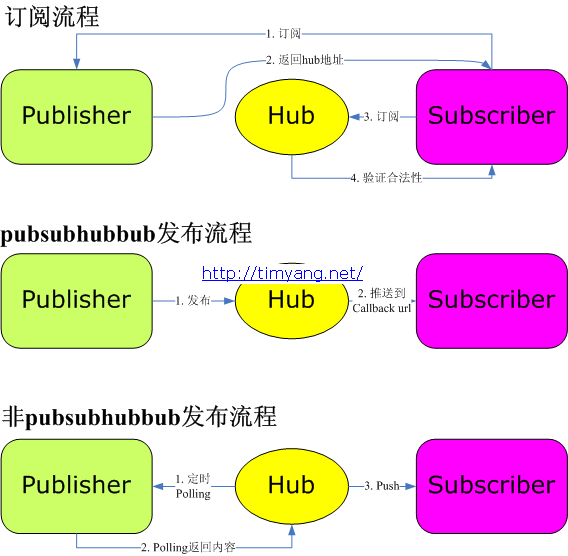
    原理及数据流图在官网的Slide上已经有详细描述,这里以静态图补充。

    pubsubhubbub

    价值

    Publisher发布方

    许多Blog服务提供者来说,RSS对它们来说是一个鸡肋,对运营及广告等业务没什么帮助,但是却流量很大。因此他们经常非常矛盾的维护着这个接口。如果PubSubHubbub能够在业界大范围的适用,至少从访问压力层面解除了BSP对提供RSS接口之忧。

    特例 Realtime RSS(Twitter, 微博服务等)

    Twitter/微博等realtime RSS可以从此方案受益,按照常规的方案,订阅方为了获取realtime的结果,几乎需要以每分钟1次的频率来访问RSS API, 如果订阅方能够以PubSubHubbub的方式来访问RSS,那么RSS API的请求量几乎可以降为0

    Subscriber订阅方

    Subscriber比如RSS阅读器,搜索引擎等类似业务。Google Reader看似PubSubHubbub最大的赢家。
    另外在有hub的前提下,即使Publisher不支持PubSubHubbub, subscriber可以通过hub直接取到feed内容,就是说类似阅读器这样的应用现在就可以完全切换到PubSubHubbub体系上。

    不适合的场景

    Twitter client, 由于client处于防火墙后,通常也没有固定的可直接访问的HTTP Endpoint, 所以没法适用PubSubHubbub

    最后,PubSubHubbub是否在业界大范围的改变现状,我们拭目以待。

    如何写nginx module

    对于一些访问量特别大,业务逻辑也相对简单的Web调用来说,通过一个nginx module来实现是一种比较好的优化方法。实现一个nginx module实际上比较简单。

    1. nginx 配置添加

    ./configure --add-module=/path/to/module1/source

    2. 添加 /path/to/module1/source/config 文件,内容

    ngx_addon_name=ngx_http_hello_module
    HTTP_MODULES="$HTTP_MODULES ngx_http_hello_module"
    NGX_ADDON_SRCS="$NGX_ADDON_SRCS $ngx_addon_dir/ngx_http_hello_module.c"
    CORE_LIBS="$CORE_LIBS -lfoo"

    最后一行如果没有使用其他library, 可以去掉

    3. 源代码 /path/to/module1/source/ngx_http_hello_module.c, 主要的业务逻辑在make_http_get_body 中完善。典型的hello world源代码如下

    #include <ngx_config.h>
    #include <ngx_core.h>
    #include <ngx_http.h>
    
    #define OUT_BUFSIZE 256
    
    static char *ngx_http_hello_set(ngx_conf_t *cf, ngx_command_t *cmd, void *conf);
    static char *ngx_http_foo_set(ngx_conf_t *cf, ngx_command_t *cmd, void *conf);
    
    static ngx_int_t ngx_http_hello_process_init(ngx_cycle_t *cycle);
    static void ngx_http_hello_process_exit(ngx_cycle_t *cycle);
    
    static ngx_int_t make_http_header(ngx_http_request_t *r);
    static ngx_int_t make_http_get_body(ngx_http_request_t *r, char *out_buf);
    
    static char g_foo_settings[64] = {0};
    
    /* Commands */
    static ngx_command_t  ngx_http_hello_commands[] = {
        { ngx_string("ngx_hello_module"),
          NGX_HTTP_LOC_CONF|NGX_CONF_NOARGS,
          ngx_http_hello_set,
          NGX_HTTP_LOC_CONF_OFFSET,
          0,
          NULL },
    
        { ngx_string("hello"),
          NGX_HTTP_LOC_CONF|NGX_CONF_TAKE1,
          ngx_http_foo_set,
          NGX_HTTP_LOC_CONF_OFFSET,
          0,
          NULL },  
    
          ngx_null_command
    };
    
    static ngx_http_module_t  ngx_http_hello_module_ctx = {
        NULL,                                  /* preconfiguration */
        NULL,                                     /* postconfiguration */
    
        NULL,                                  /* create main configuration */
        NULL,                                  /* init main configuration */
    
        NULL,                                  /* create server configuration */
        NULL,                                  /* merge server configuration */
    
        NULL,                                  /* create location configuration */
        NULL                                   /* merge location configuration */
    };
    
    /* hook */
    ngx_module_t  ngx_http_hello_module = {
        NGX_MODULE_V1,
        &ngx_http_hello_module_ctx,              /* module context */
        ngx_http_hello_commands,                 /* module directives */
        NGX_HTTP_MODULE,                       /* module type */
        NULL,                                  /* init master */
        NULL,                                  /* init module */
        ngx_http_hello_process_init,             /* init process */
        NULL,                                  /* init thread */
        NULL,                                  /* exit thread */
        ngx_http_hello_process_exit,             /* exit process */
        NULL,                                  /* exit master */
        NGX_MODULE_V1_PADDING
    };
    
    /* setting header for no-cache */
    static ngx_int_t make_http_header(ngx_http_request_t *r){
        ngx_uint_t        i;
        ngx_table_elt_t  *cc, **ccp;
    
        r->headers_out.content_type.len = sizeof("text/html") - 1;
        r->headers_out.content_type.data = (u_char *) "text/html";
        ccp = r->headers_out.cache_control.elts;
        if (ccp == NULL) {
    
            if (ngx_array_init(&r->headers_out.cache_control, r->pool,
                               1, sizeof(ngx_table_elt_t *))
                != NGX_OK)
            {
                return NGX_ERROR;
            }
    
            ccp = ngx_array_push(&r->headers_out.cache_control);
            if (ccp == NULL) {
                return NGX_ERROR;
            }
    
            cc = ngx_list_push(&r->headers_out.headers);
            if (cc == NULL) {
                return NGX_ERROR;
            }
    
            cc->hash = 1;
            cc->key.len = sizeof("Cache-Control") - 1;
            cc->key.data = (u_char *) "Cache-Control";
    
            *ccp = cc;
    
        } else {
            for (i = 1; i < r->headers_out.cache_control.nelts; i++) {
                ccp[i]->hash = 0;
            }
    
            cc = ccp[0];
        }
    
        cc->value.len = sizeof("no-cache") - 1;
        cc->value.data = (u_char *) "no-cache";
    
        return NGX_OK;
    }
    
    static ngx_int_t make_http_get_body(ngx_http_request_t *r, char *out_buf){
        char *qs_start = (char *)r->args_start;
        char *qs_end = (char *)r->uri_end;
        char uri[128] = {0};
        char *id;
    
        if (qs_start == NULL || qs_end == NULL){
            return NGX_HTTP_BAD_REQUEST;
        }
        if ((memcmp(qs_start, "id=", 3) == 0)){
            id = qs_start + 3;
            *qs_end = '\0';
        }else{
            return NGX_HTTP_BAD_REQUEST;
        }
        snprintf(uri, r->uri.len + 1, "%s", r->uri.data);
        sprintf(out_buf, "Author: http://timyang.net/ nconfig=%snid=%snuri=%snret=%lxn", g_foo_settings, id, uri, ngx_random());
        return NGX_OK;
    }
    
    static ngx_int_t
    ngx_http_hello_handler(ngx_http_request_t *r)
    {
        ngx_int_t     rc;
        ngx_buf_t    *b;
        ngx_chain_t   out;
    
        /* Http Output Buffer */
        char out_buf[OUT_BUFSIZE] = {0};
    
        if (!(r->method & (NGX_HTTP_GET|NGX_HTTP_HEAD))) {
            return NGX_HTTP_NOT_ALLOWED;
        }
    
        rc = ngx_http_discard_request_body(r);
    
        if (rc != NGX_OK && rc != NGX_AGAIN) {
            return rc;
        }
    
        /* make http header */
        rc = make_http_header(r);
        if (rc != NGX_OK) {
            return rc;
        }
    
        if (r->method == NGX_HTTP_HEAD) {
            r->headers_out.status = NGX_HTTP_OK;
            return ngx_http_send_header(r);
        } else if (r->method == NGX_HTTP_GET) {
            /* make http get body buffer */
            rc = make_http_get_body(r, out_buf);
            if (rc != NGX_OK) {
                return rc;
            }
        } else {
            return NGX_HTTP_NOT_ALLOWED;
        }
    
        b = ngx_pcalloc(r->pool, sizeof(ngx_buf_t));
        if (b == NULL) {
            return NGX_HTTP_INTERNAL_SERVER_ERROR;
        }
    
        out.buf = b;
        out.next = NULL;
    
        b->pos = (u_char *)out_buf;
        b->last = (u_char *)out_buf + strlen(out_buf);
        b->memory = 1;
        b->last_buf = 1;
        r->headers_out.status = NGX_HTTP_OK;
        r->headers_out.content_length_n = strlen(out_buf);
    
        rc = ngx_http_send_header(r);
    
        if (rc == NGX_ERROR || rc > NGX_OK || r->header_only) {
            return rc;
        }
    
        return ngx_http_output_filter(r, &out);
    }
    
    static char *
    ngx_http_hello_set(ngx_conf_t *cf, ngx_command_t *cmd, void *conf)
    {
        ngx_http_core_loc_conf_t *clcf = ngx_http_conf_get_module_loc_conf(cf, ngx_http_core_module);
    
        /* register hanlder */
        clcf->handler = ngx_http_hello_handler;
    
        return NGX_CONF_OK;
    }
    
    static char *
    ngx_http_foo_set(ngx_conf_t *cf, ngx_command_t *cmd, void *conf)
    {
        ngx_str_t *value = cf->args->elts;
        memcpy(g_foo_settings, value[1].data, value[1].len);
        g_foo_settings[value[1].len] = '�';
    
        return NGX_CONF_OK;
    }
    
    static ngx_int_t
    ngx_http_hello_process_init(ngx_cycle_t *cycle)
    {
        // do some init here
        return NGX_OK;
    }
    
    static void
    ngx_http_hello_process_exit(ngx_cycle_t *cycle)
    {
        return;
    }

    4. 配置文件 nginx.conf

            location /hello {
                ngx_hello_module;
                hello 1234;
            }

    5. 访问 http://localhost/hello

    也可参考更详细的英文说明:
    Emiller’s Guide To Nginx Module Development